
Need to Know
- To collect waivers online for free, you can use a digital form builder to replace paper documents with secure, searchable entries.
- For informal approvals, a “Check-to-Agree” box is often sufficient.
- For high-liability events, you should use ESIGN Act-compliant eSignatures to ensure the document is legally binding.
Looking to collect waivers online for free? You aren’t alone. PTA leaders, sports coaches, and troop leaders all know the struggle: you just want the secure signatures on record so the kids can finally get to the fun part. In this guide, we’ll show you the simplest way to create an online waiver form that looks professional and, most importantly, takes your participants only seconds to sign.
What are the benefits of collecting waivers online?
Digital waivers replace the “paper trail” with a secure, searchable database. Key benefits include:
- Higher Completion Rates: Users can sign from any device without needing a printer or scanner.
- Legal Compliance: To be legally binding, digital waiver tools must comply with the ESIGN Act. This ensures that electronic signatures carry the same legal weight as traditional paper-and-ink signatures.
- Data Integrity: Eliminate the risk of losing physical forms or misreading messy handwriting.
- Real-Time Tracking: Organizers can see exactly who has signed and who is still missing a form at a glance.

Pro-Tip:
While a standalone waiver is a great start, the real magic happens when you collect payments and forms together in a single step. Check out our guide to all-in-one group payments and forms to see how a one-stop-shop approach can save you hours of admin work and increase participation.
Check-to-agree box vs e-signature: What’s the difference?
Once you decide to move your paperwork online, it’s important to choose the right level of documentation for your activity. Cheddar Up provides two distinct ways to handle agreements:
For Informal Approvals: The “Check-to-Agree” Form
- Standard Fields: Quickly capture essential participant details like names, emails, and phone numbers.
- Custom Logic: Add questions to collect specific data, such as t-shirt sizes or emergency contact info.
- Mandatory Consent: Use required checkboxes to ensure every participant acknowledges your terms before finishing.
Need something more official? The eSignature
This provides a secure, legally binding way to collect real signatures when it matters most, such as for high-liability sports, field trips, or photo release waivers.
By using a platform that supports all-in-one group payments and forms, you ensure that these signatures are automatically tied to the participant’s payment record, creating a seamless audit trail.
With Cheddar Up’s online waiver signing tool, you can create:
- Parent permission slips
- Marching band travel forms
- Troop activity waivers
- PTA student participation forms
- Sales terms and conditions
- HOA variance requests
- Sports liability waivers
- Photo release waivers
- Whatever you need!
See how a secure digital form looks for your participants, whether you’re collecting a waiver only or pairing it with a payment. Even better, each example doubles as a ready-made template, so you can customize and launch your own collection in minutes.



“For our High School’s Grad Night, I needed to collect the student’s name, address, email, cell phone number, t-shirt size, emergency contacts, medical conditions, and the name of who they wanted to sit beside on the bus…in addition to a signed waiver.
With Cheddar Up, the parent was able to provide all of this on the spot along with payment.”
– Gloria Halfacre, PTSA Leader, Los Angeles, CA
How to collect a waiver online
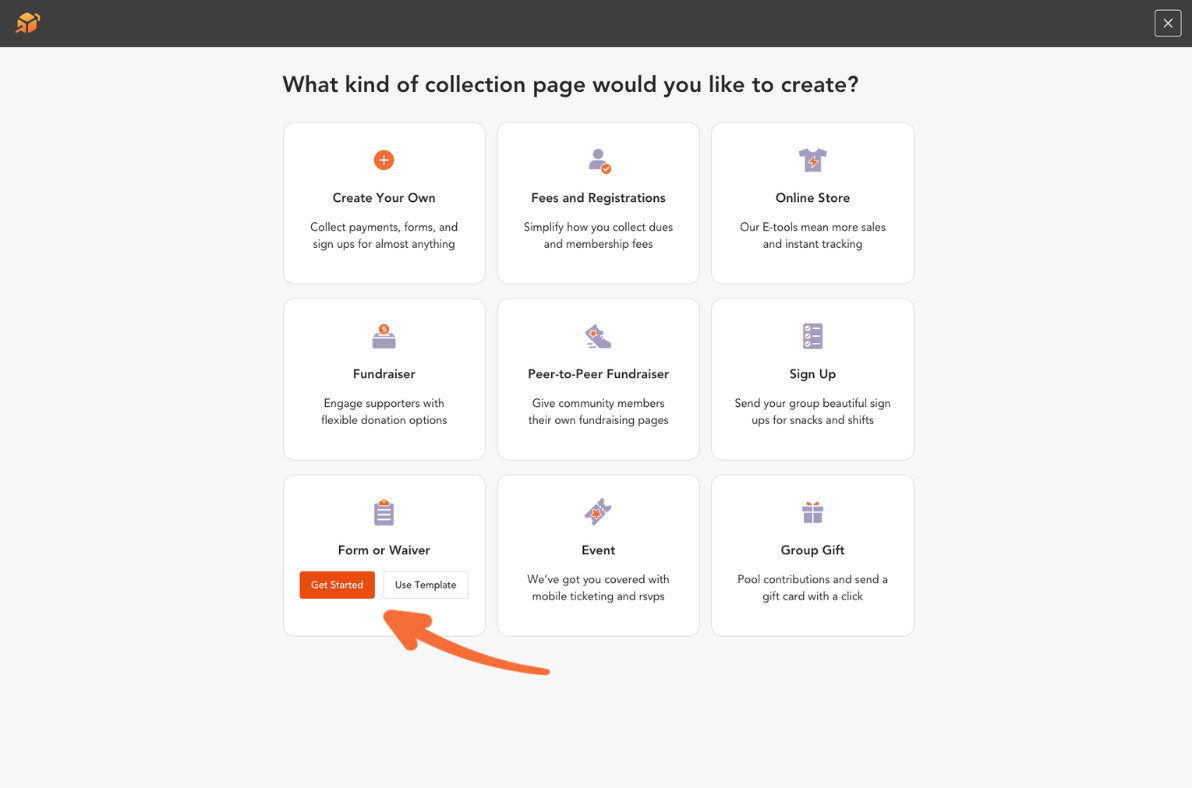
In the Cheddar Up collection dashboard, you’ll click “Create a Collection” in the top right corner to begin.

Click “Add Form”
Select “Form or Waiver” in the collection builder to create a new waiver. Already have a collection set up? Just head to “Forms” in the left-hand menu to add one anytime.

Add your text and signers
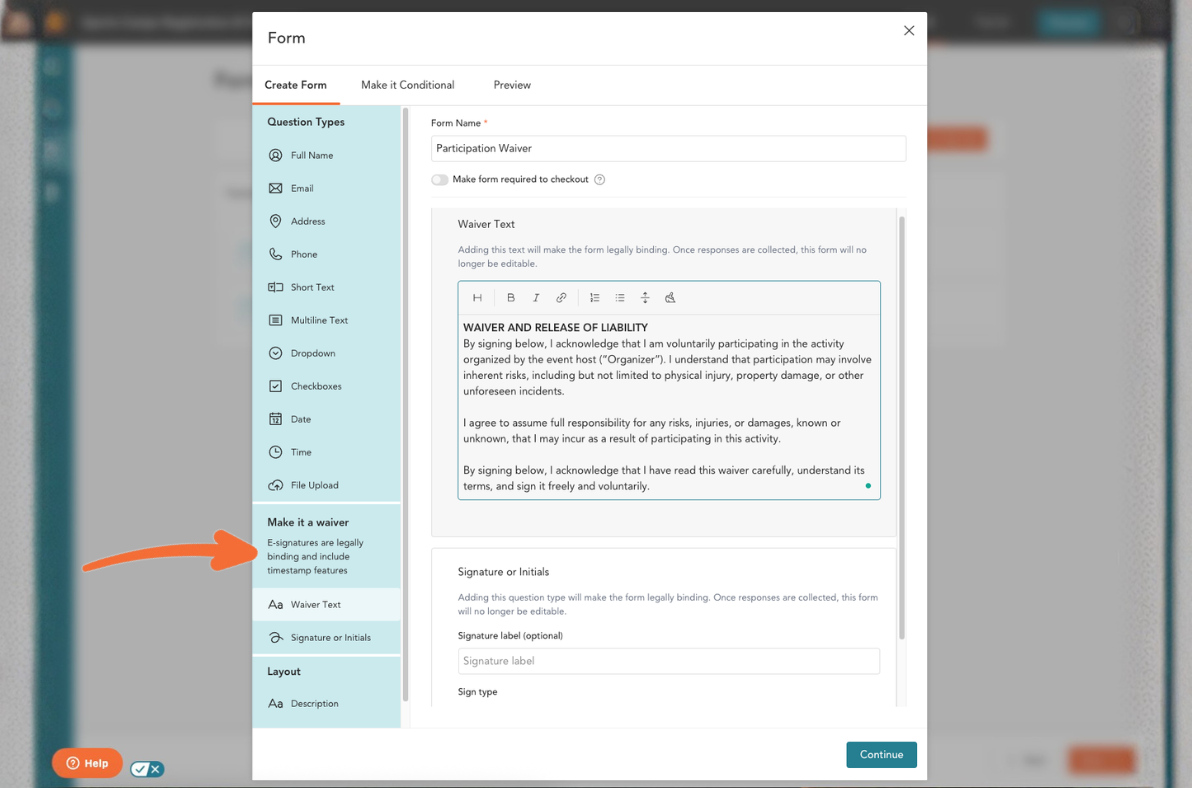

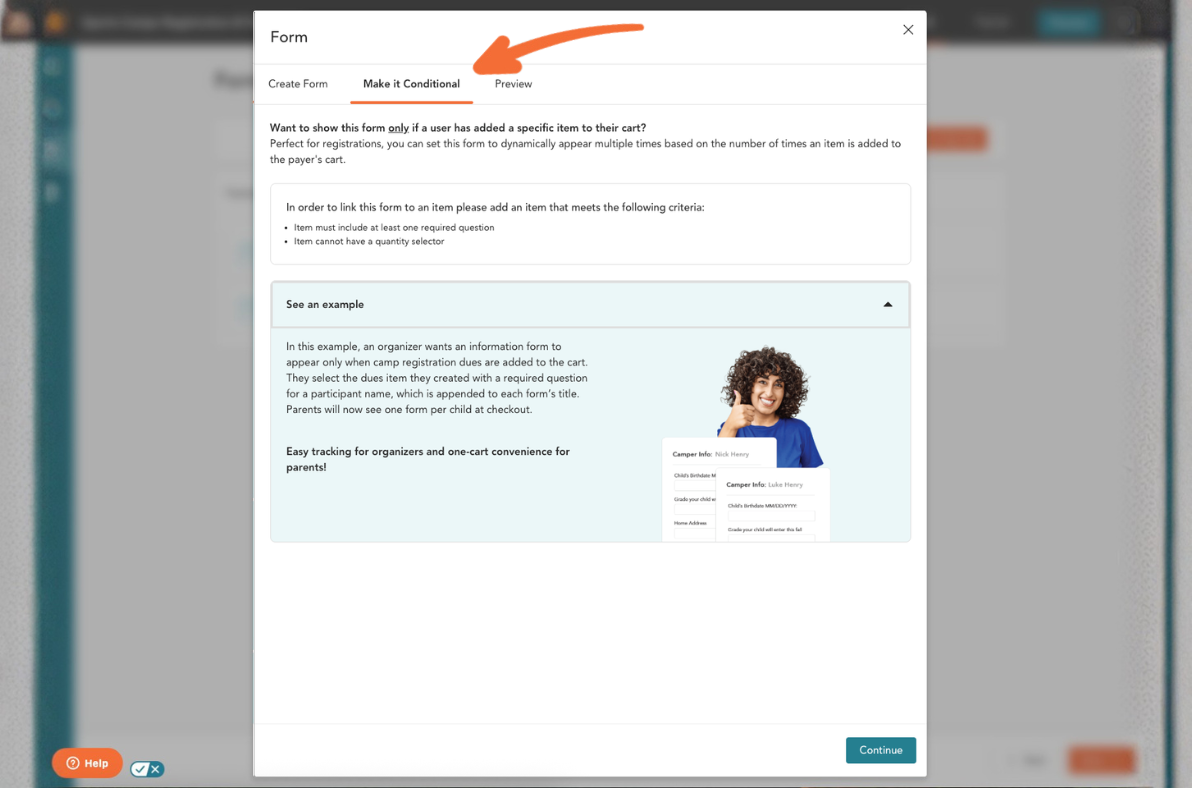
Settings
If your collection meets the requirements for conditional forms, you can make your waiver conditional. This is a great option for registrations or collections with items that include required questions so participants only see and sign the waiver when it applies.
Once your settings look right, click “Continue” to preview your waiver.

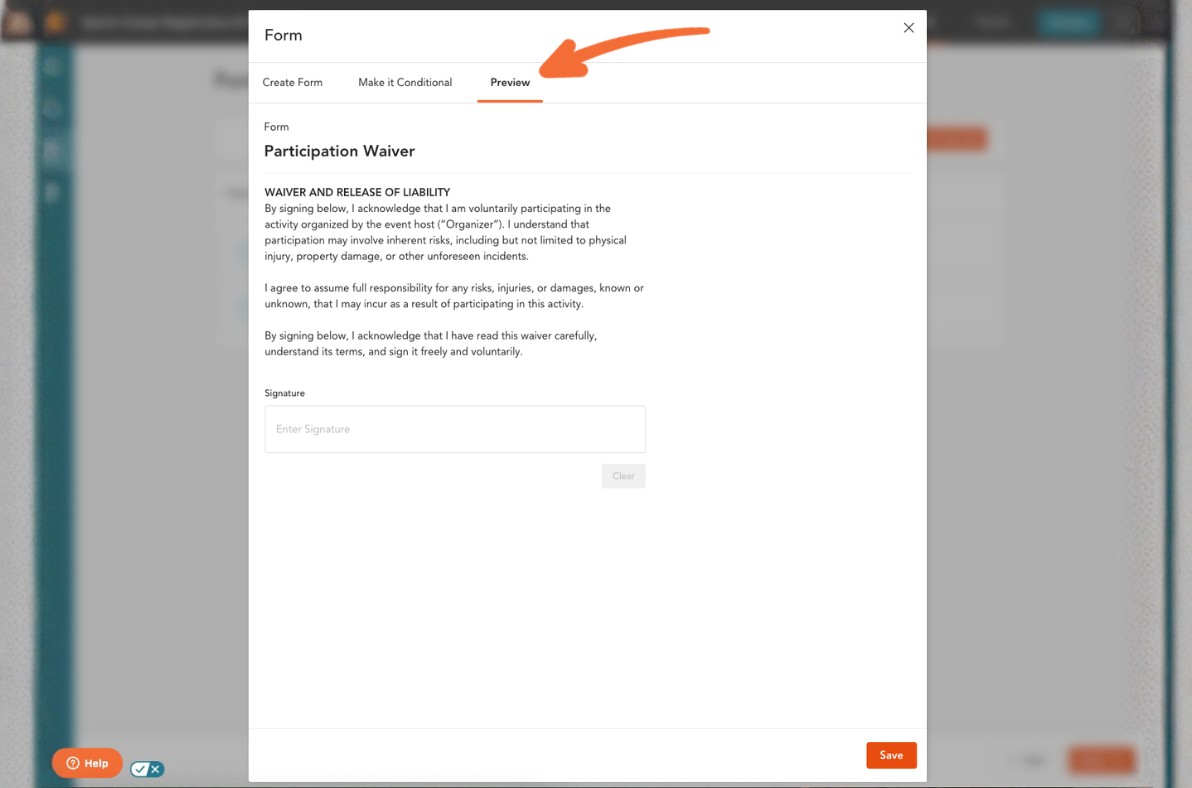
Preview your waiver and save
Three required fields (first name, last name, and e-signature) will be added below your waiver text automatically. Once you are done with any edits, click “Save Waiver.”

View responses
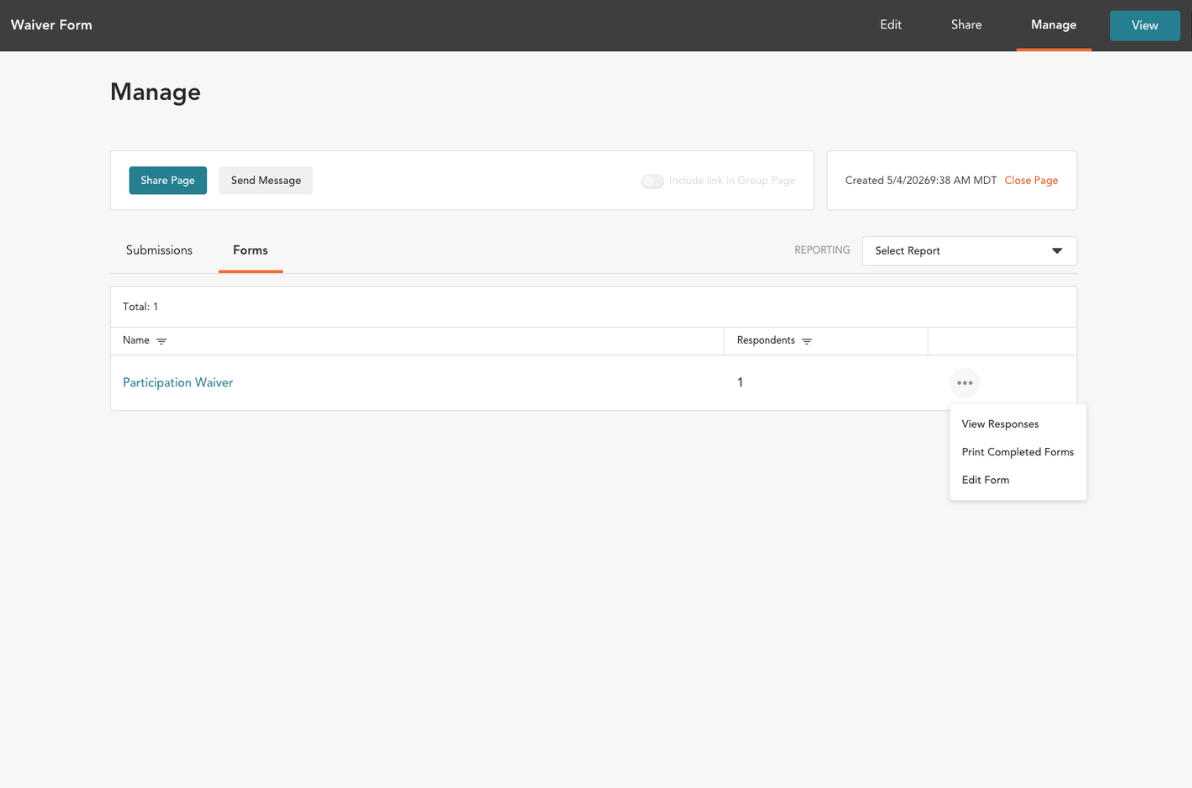
All collected signatures will be saved automatically under the “Manage” view of the collection builder. To see them, click the “…”, then “View Responses.” You may choose to print each form, or, thanks to our mobile app, access the signed forms digitally on the go. (Here’s a video to help!)
Want to see Cheddar Up in action?
Watch a quick demo or register for a live session to see how easy it is to collect an online waiver online and manage your group with Cheddar Up.

Frequently Asked Questions
Is an electronic signature on a waiver legally binding?
Yes.In the United States, digital waivers are legally binding provided they comply with the ESIGN Act. This federal law establishes that electronic signatures carry the same legal standing as traditional paper-and-ink signatures.
Can I collect waivers and payments at the same time?
Yes, and this is considered a best practice for group organizers. By using all-in-one group payments and forms, you can require a waiver signature as a mandatory step in the checkout process.
What is the difference between a "Check-to-Agree" form and an eSignature?
A “Check-to-Agree” form is often sufficient for simple terms of service or photo releases. However, for high-liability activities (like sports or field trips), an eSignature is preferred.
How do digital waivers improve data security and privacy?
Unlike paper waivers, which are often left on clipboards or stored in unsecured filing cabinets, digital waivers are encrypted and stored in secure cloud environments.

Before you go
There’s more where that came from.
Free, waiver-style forms and fully eSigned documents are just the beginning. Explore all the ways you can collect information with Cheddar Up.
You may also like:

How LD Bell Band Boosters Simplify Band Purchases
Running a band booster organization comes with plenty of moving pieces. For LD Bell Band Boosters, that means helping support a large band program while selling spirit wear, supplying required student equipment and materials, offering occasional meals, and managing purchases at events throughout the year.
Like most volunteer-run groups, the people doing the work change over time. That makes simple systems especially valuable. New volunteers need to be able to step in, understand what was done before, and keep things moving without rebuilding every process from scratch.
Additionally, the way families expect to pay has changed over time. Cash is no longer the default, especially when parents and students are making purchases at events.
For the LD Bell Band Boosters treasurer, Stephanie Renfro, Cheddar Up helps solve both challenges.

Booked Authors streamlines school book sales with Cheddar Up
As Executive Director of Booked Authors, Allyson Hickey oversees school book sales tied to author visits across the country. Many of those sales happen at the same time, often with tight timelines and high expectations from schools, PTAs, and families.
For years, the process relied on paper order forms sent home in backpacks, checks returned on uneven schedules, and handwritten personalization details that were not always easy to read. Tracking orders required follow-up, and even small errors created extra work during already busy seasons.
As school book sales grew in volume, the cracks became harder to ignore. Managing multiple author visits and book orders at once left little room for inefficiency. Allyson knew the process needed to support growth without adding more manual work.

How to run a PTA holiday shop (plus a free volunteer template)
The PTA holiday shop is one of those feel-good school traditions that brings smiles and a little seasonal sparkle. Kids pick out gifts for their families on their own, and your school raises money and builds community spirit. As the PTA member running it, you’ll have to make a lot of decisions, like who supplies the inventory, what to price at $1 versus $5, how many volunteers each shift needs, and how kids pay at the register.
This guide walks you through everything you’ll need to host a successful PTA holiday shop, from eight weeks out to cleanup day. You’ll also find a free online volunteer sign up template you can customize and share with your school community. A PTA holiday shop is a pop-up store your parent group runs at school, where students buy small, low-priced gifts for family and friends. Volunteers help kids shop and wrap, and the PTA keeps the proceeds for school programs.

The Best Giving Tuesday Campaigns: A Guide to Success
Giving Tuesday has quickly grown into the world’s largest day of giving. Since its start in 2012, it has spread to over 100 countries, inspiring billions in donations every year. For nonprofits, schools, and community groups, it’s a powerful chance to rally supporters and meet ambitious goals. But not all campaigns achieve the same results. Some stand out, raising impressive amounts and energizing their communities. So, what separates the best Giving Tuesday campaigns from the rest? Let’s break down the traits of successful campaigns and how you can apply them to your own efforts.