Online ticket sales for schools
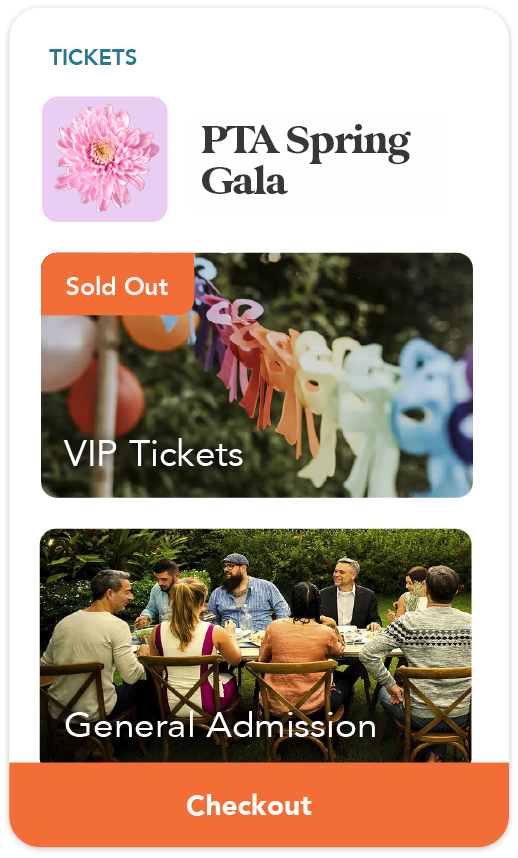
Cheddar Up is a ticketing system for schools and the groups that support them. Families buy tickets from a custom link and get QR code tickets by email. Your group scans them at the door using the Cheddar Up app, and every sale appears in your reports.
Trusted by over 10,000 schools and booster clubs to collect payments and forms online


How to sell school event tickets online
Cheddar Up works as a school event ticketing system. Buyers check out on their computer or phone and receive their tickets by email before the big event.

Step 1: Create
Build a collection and add a ticket for each type you’re selling, like adult or student. Set the price and how many are available, then add the date and location.
Step 2: Share
Share the link in your school newsletter, or print a QR code for flyers.
Step 3: Manage
Every ticket comes with a QR code. Scan tickets at the door with the Cheddar Up app.
Curious how Cheddar Up works? Take a tour before you sign up.

Ticketing for every school event
From the first home game to graduation day, sell tickets for any school event from the same account.
- Games and athletic events: Fans buy general admission and student tickets in advance, and gate volunteers scan them as they enter.
- Plays, concerts and recitals: Create a ticket for each performance and limit sales at your auditorium’s seat count.
- Dances and prom: Every ticket collects the attendee’s name, so your guest list is ready before the doors open.
- Graduation and commencement: Limit how many tickets each person can buy, and collect the graduate’s name with every order.
- Fundraisers and family nights: Sell carnival and trivia night tickets online, then take walk-up payments at the door.
Ticketing software made for school groups
Selling tickets is one part of running a school event. Cheddar Up also handles what goes with it, so you don’t need a separate form or payment app.



Guides for school ticketed events
Get tips for planning and selling tickets for your next school event.

Prom tickets
How to price, sell and check in prom tickets.

Graduation tickets
Common questions about graduation tickets and how schools hand them out.

Create event tickets
A step-by-step walkthrough of building tickets in Cheddar Up.
Start with a template
Pick a ready-made school event collection, edit the details and share it today.



Here’s what other schools say about us

Northeast Elementary School PTA


Greenview Upper Elementary PTA


Venice High School PTSA

Frequently Asked Questions
How do I sell tickets for a school event online?
Sign up for Cheddar Up on the Team plan for QR code tickets, build a collection for your event and add a ticket item. Set the price, the number available and the event date and location. Then share the collection link with parents and caregivers. Each buyer gets a QR code ticket you can scan at the door.
Do families need an account or an app to buy tickets?
No. They buy tickets from your collection link without downloading an app or creating an account. They can pay by card, including Apple Pay and Google Pay, or by eCheck.
Want to learn more? Check out our booster club software guide.
How do I scan tickets at the door?
Open your collection in the Cheddar Up app and tap Scan Tickets, then point your phone’s camera at each QR code. If a code won’t scan, you can enter the ticket number by hand. Volunteers can scan from their own phones with an Event Code.
Can I stop ticket sales when the event is sold out?
Yes. Set the number of tickets available when you create each ticket. You can also show buyers how many are left. Once they’re gone, the ticket shows as sold out and sales stop. Turn on a waitlist so people can sign up to be notified if more tickets open.
Can I use Cheddar Up as graduation ticketing software?
Yes. Create a ticket for the ceremony, set how many are available and cap how many one person can buy. Ask for the graduate’s name with each order. Guests get QR code tickets by email, and staff scan them at the entrance.
Can buyers choose their seats?
No. Tickets are general admission. You can sell different ticket types, like a reserved section or VIP, each with its own price and quantity. Buyers don’t pick from a seating chart, so events that need assigned seats will need another tool.
Can schools sell tickets online for free?
Yes. On the free Basic plan, you can sell tickets as items and see every buyer in your reports. However, it doesn’t include QR code tickets or door scanning. Those come with the Team plan. Processing fees go to buyers by default, so your group doesn’t pay per ticket. See our pricing page for details.
Ready to start?
Start your collection
Create a free account and have a collection page ready to share in minutes.
Join a live session
Learn the basics from our team and don’t hesitate to ask questions as you go.